

A RAID array is a storage technology that combines multiple hard drives into a single logical unit to improve performance, reliability, or both. The term RAID stands for Redundant Array of Independent Disks. It was originally developed to provide better data protection and faster access speeds than a single drive could offer on its own.
What is a RAID array becomes an important question in modern computing because data storage demands are increasing rapidly. Businesses, gamers, and servers rely on RAID systems to reduce the risk of data loss and improve system efficiency. By distributing data across multiple disks, RAID ensures better performance and redundancy depending on configuration.
How a RAID Array Works
A RAID array works by splitting or duplicating data across multiple drives. This process is controlled by either a hardware RAID controller or software-based management inside the operating system. The way data is arranged depends on the RAID level used, which determines speed, safety, or a balance of both.
When asking what is a RAID array, it is important to understand key techniques like striping, mirroring, and parity. Striping divides data across multiple disks for faster performance, mirroring duplicates data for safety, and parity adds error-checking information. These methods work together to ensure efficiency and data protection.
Different RAID Levels Explained
RAID 0 is focused entirely on speed. It splits data across multiple drives but offers no redundancy, meaning if one drive fails, all data is lost. RAID 1, on the other hand, mirrors data exactly across two drives, providing strong protection but reducing usable storage capacity by half.
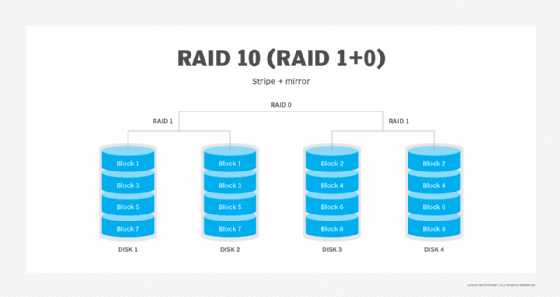
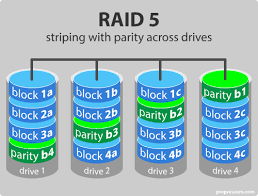
More advanced configurations like RAID 5 and RAID 6 offer a balance between performance and safety. RAID 5 uses parity data to recover from a single drive failure, while RAID 6 can survive two drive failures. RAID 10 combines mirroring and striping, making it one of the most reliable and fast options for enterprise systems.
Advantages of Using a RAID Array
One of the main advantages of a RAID array is improved data protection. Depending on the configuration, RAID can recover data even if one or more drives fail. This makes it highly valuable for businesses and systems where data loss is unacceptable.
Another benefit when understanding what is a RAID array is performance improvement. By distributing data across multiple disks, read and write speeds can be significantly increased. This is especially useful in servers, databases, and high-performance computing environments where speed and reliability are critical.
Disadvantages and Limitations of RAID Systems
Despite its benefits, RAID is not a perfect solution. One major limitation is cost, as multiple hard drives are required to build a RAID array. Additionally, setup and configuration can be complex for beginners, especially when choosing the correct RAID level for specific needs.
Another important point when learning what is a RAID array is that it does not replace backups. Even with redundancy, RAID cannot protect against accidental deletion, malware, or catastrophic system failure. Therefore, external backups are still necessary for complete data security.
RAID Array in Real-World Applications
RAID arrays are widely used in servers and data centers where large amounts of data must be processed and protected continuously. Companies rely on RAID systems to ensure uptime and prevent data loss in critical environments such as banking, cloud services, and enterprise storage systems.
In addition to business use, RAID arrays are also popular among gamers, video editors, and creative professionals. These users benefit from faster load times and improved file handling. When asking what is a RAID array in practical terms, it is a technology that enhances both performance and reliability in demanding digital environments.
Hardware RAID vs Software RAID
Hardware RAID uses a dedicated controller to manage the array, offering better performance and lower CPU usage. It is commonly found in enterprise systems where reliability and speed are essential. However, it is more expensive compared to software-based solutions.
Software RAID is managed by the operating system and does not require special hardware. It is more flexible and cost-effective, making it suitable for personal computers and small setups. However, it may use system resources and offer slightly lower performance than hardware RAID.
Choosing the Right RAID Level
Selecting the right RAID level depends on your priorities such as speed, storage capacity, and data protection. For maximum performance, RAID 0 may be suitable, while RAID 1 is better for simple data redundancy. RAID 5 and RAID 10 are often preferred for balanced performance and reliability.
When understanding what is a RAID array, it is important to evaluate long-term needs. Businesses typically prioritize data safety and uptime, while individual users may focus on speed or cost efficiency. The right choice ensures optimal system performance and protection.
Conclusion
A RAID array is a powerful storage solution that improves both performance and data protection by combining multiple drives into one system. Different RAID levels offer different benefits, from speed optimization to full redundancy, making it suitable for a wide range of users and applications.
Understanding what is a RAID array helps users make informed decisions about data storage strategies. While RAID provides strong advantages, it should always be used alongside proper backup systems to ensure complete data security and reliability.
Frequently Asked Questions (FAQs)
What is a RAID array in simple terms?
A RAID array is a system that combines multiple hard drives into one unit to improve speed, storage, or data protection.
Which RAID level is the safest?
RAID 1, RAID 5, and RAID 6 are considered the safest because they include redundancy features.
Does RAID replace backups?
No, RAID is not a replacement for backups because it cannot protect against all types of data loss.
Is RAID good for gaming PCs?
Yes, RAID 0 or RAID 10 can improve performance, but it depends on user needs.
What happens if a drive fails in a RAID array?
It depends on the RAID level. Some configurations allow data recovery, while others may result in data loss.
Sie können auch lesen: Wie funktioniert Western Union in Hannover?